What is on-page SEO? Making ensuring your website’s coding and content are in a format that search engines can comprehend is known as “on-page SEO”. When you think about on page SEO you look at your page name heading, word choice, images, URL and internal links. All of these elements should be optimised to help search engines find your page and improve its ranking. They are all fully editable.
I’ve been writing for search for ten years now. Every time I talk to a new beginner I say the same thing: start with on-page SEO. You don’t need a budget or even one backlink to make it work. All you have to do is add the essentials. What is on-page SEO? In this guide I’ll explain what, on-page SEO is, why it still matters in 2026 and the 10 steps I follow before I publish any page. These steps are simple but powerful. They help your content stand out and get found.
One component of the whole SEO picture is on-page SEO. To see how it all fits together read our SEO guide after this article.

On-Page SEO Defined in Simple Terms
Just like a librarian has millions of books on their shelf, a search engine will have millions of web pages. A librarian must pick the book for each question. A search engine must pick the web page, for each question. What is on-page SEO? On-page SEO is how you tag your page so the librarian knows what’s inside.
For instance say you write a blog post about baking sourdough bread. On-page SEO means using “sourdough bread recipe” in your title breaking the post into sections with headings like “Mixing the Dough” or “Baking Tips ” naming your images clearly—like “sourdough-bread-oven-heat.jpg”—and linking to other posts you’ve written such as ones, about flour types or starter maintenance. All of this happens on your own page. It doesn’t happen on someone ’s site. It’s all your responsibility. That is what is on-page SEO in practice.
Why Is On-Page SEO Important?
I’ve noticed that search engines now use intelligence when determining whether a page is answering a query.Thus it is more important than ever to write content.
What is on-page SEO? Effective on-page SEO will help you:
- Rank, for the terms your audience are searching for.
- Earn clicks, with better titles and descriptions.
- Keep visitors reading longer of leaving.
- Appear in featured snippets and AI-generated answers.
It is also the form of SEO. Every improvement is free in your control and often shows results faster, than anything else you can do.
On-Page SEO vs Off-Page SEO vs Technical SEO
Beginners often get these three confused. Here is the difference:
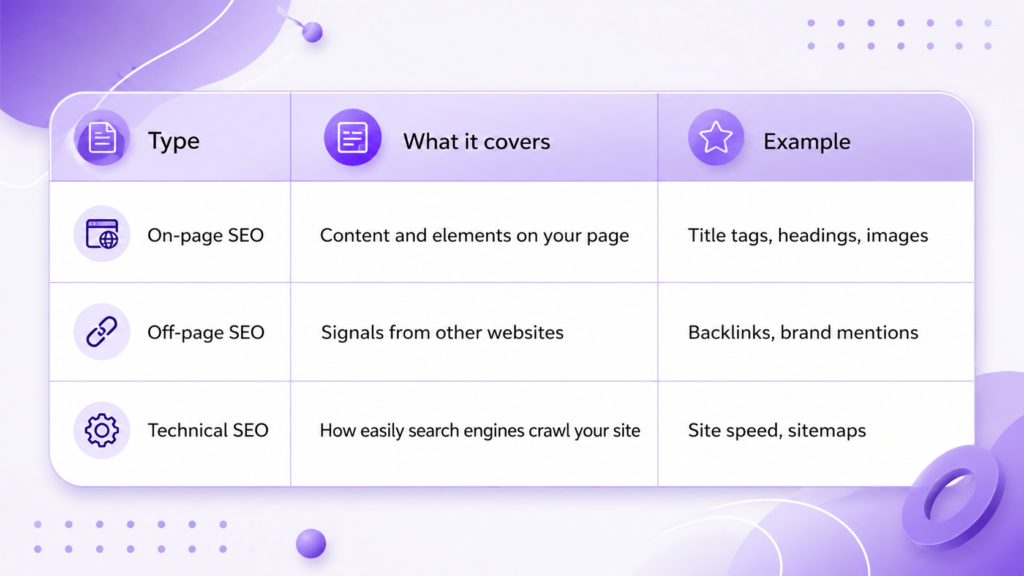
You need all three. The simplest SEO to learn and get better at is on-page SEO.

Step 1: Do Keyword Research and Consider Search Intent
All optimized pages have one main keyword target. Find the phrase that your audience types into Google then ask what they really want when they type it. That want is called search intent. Someone searching “what is on‑page SEO” wants an explanation, not a sales pitch.
If you are new to this learn the process, in our guide to keyword research then come back. Pick one keyword per page and a few related phrases to use naturally.
Step 2: Create an Attractive Title Tag
In search results the title tag appears as the headline that catches the eye. What is on-page SEO? Here are my rules:
- Ensure your focus keyword is included towards the start of your title tag.
- Keep the title tag under sixty characters so it does not get cut off.
- Promise a benefit in the title tag, such, as “10 Easy Steps”.
- Never reuse the title tag on two different pages.
Step 3: Write a Meta Description
Meta descriptions cannot improve your ranking. Meta descriptions can really help increase your click‑through rate. Include your keyword and write a description that is between 150 and 160 characters long. Meta descriptions are, like advertising your page to visitors.
Step 4: Use Headings
Headings help visitors read your page easily. Additionally, this will show search engines how well your information is structured. Headings will improve the readability of your website and demonstrate to search engines how you have organised your content. Both your user experience and search engine ranking will increase as a result. What is on-page SEO? Only use 1 H1 heading on your page with your focus keyword. Use H2 headings to separate different sections and H3 headings for sub points. Write your headlines carefully because most readers will only scan your page.
Step 5: Write Content That Truly Helps
I have seen that Content is the heart of, on-page SEO and Content is where beginners can beat websites. What is on-page SEO? Follow these habits:
- Provide a paragraph-long response to the question before expanding.
- I suggest you use the focus keyword in the 100 words and use the focus keyword a few times when it reads naturally.
- Cover the related questions readersre likely to ask next.
- Keep paragraphs language and use bullet points, for lists.
- Add your examples your examples or experience so your page is not a copy of everyone .
- Update posts, at least once a year.
Never try to jam keywords into sentences just because you think it helps If the sentence sounds off when you read it out loud change it . Always write for people first. When you do that search engines will naturally catch up.
Step 6: Clean up your URLs
Your URLs should contain your keyword and be brief and easy to understand. Compare: /post?id=4829 with /what-is-on-page- seo. The former will tell your readers and search engines exactly what they can expect. Keep them lowercase, use hyphens between words and don’t include any unnecessary words.
Step 7: Make your photos better
Large file sizes can make your page load slowly but images can also increase engagement. To balance this compress all your images. Use modern formats like webp. What is on-page SEO? Give your files names, such as ‘on-page-seo-checklist.webp’ instead of generic names like ‘IMG001.webp’. Also add alt text to your images. This helps people who’re visually impaired and gives search engines more context, about your content.
Step 8: Internal & External Links
Internal links help search engines understand how your information flows across your pages. Use descriptive text for your links rather than ‘click here,’. All your supporting articles should link back to your pillar page (like our SEO guide).
What is on-page SEO? Adding links, to sources can make your work seem reliable. Be sure to link to well‑known and trustworthy sources whenever it benefits your audience.
Step 9: Page speed & mobile friendly
A large majority of searches are on a phone. If your page is slow or not mobile friendly you’ll lose readers. What is on-page SEO? Page Speed Insights tool to check your page. Choose fonts that’re easy to read add enough space between lines and avoid any pop-ups that cover your content.
Step 10: Schema
Schema is a part of code that informs search engines what kind of content you have ( for example an article, FAQ or How-to). What is on-page SEO? This may mean your listing appears in rich results which can stand out. Most SEO plugins will add a basic schema for you so no coding is required.

On-Page SEO Checklist for Beginners
Run through this list before you hit publish: What is on-page SEO?
- Focus keyword chosen and matched to search intent
- Keyword in the title, H1, URL and first paragraph
- Meta description written and under 160 characters
- Headings organized from H1 to H3
- Content helpful and easy to scan
- Images compressed, named and given alt text
- Internal links added including one to your pillar page
- Page loads fast and looks good, on mobile

Common On-Page SEO mistakes
- Keyword stuffing – Over using keywords affects readability and your ranking.
- Not researching search intent – Having great content that doesn’t meet peoples needs.
- Thin content – Short and shallow content rarely ranks well.
- Duplicate titles – Each page should have a unique title.
- No internal linking – Pages with no links to them can be difficult for search engines to find.
Final Thoughts
What is On-Page SEO? Every page you want to show up on search engines should be optimised. This may be accomplished by creating content, with keywords and making sure your headings, titles, images and links stand out. Take the first ten steps listed above. Every time you write an article, make sure to review the list. Keep improving over time. When you are ready to go continue with our complete SEO guide. See how, on-page SEO fits with keyword research, technical SEO and link building.
Frequently Asked Questions
What is On-Page SEO?
What is on-page SEO? On-page SEO refers to optimising the content of your website and its various elements to make it easy for search engines to understand what On-Page SEO is about and make it more useful to visitors.
What are some examples of On-Page SEO?
Some common examples of On-Page SEO are adding keywords to title tags using clear headings writing alt text for images and adding links, to related pages on your website.
How long does On-Page SEO take to show results?
On-Page SEO takes a number of weeks up to a couple of months. This depends on competitiveness of the page, how well it is optimised and how often search engines will crawl and update the page.
Do I need paid tools?
No. Google Search Console and a free SEO plugin are enough to start.
Pingback: 7-Step Ultimate SEO Guide: Everything You Need to Know